
RGB and CMYK are the standards among all color systems, but how much do you really know about them?
Both models have specific uses, and there are fundamental differences between them that are important to understand—whether you’re creating designs, receiving designs, or are simply curious.
This colorful article explains these differences in simple terms and offers some tips on how to use them.
What is the difference between RGB and CMYK?
The most important difference between these color models is that:
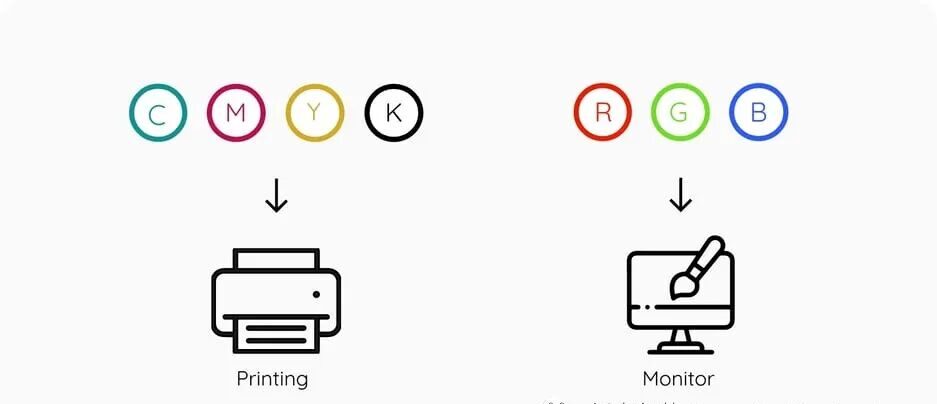
RGB is used for display on electronic screens (computers, televisions, cameras, smartphones, etc.),
while CMYK is used for printing (magazines, photographs, product packaging, direct-to-garment printing, etc.).
RGB has a wider color gamut (range of colors) than CMYK.
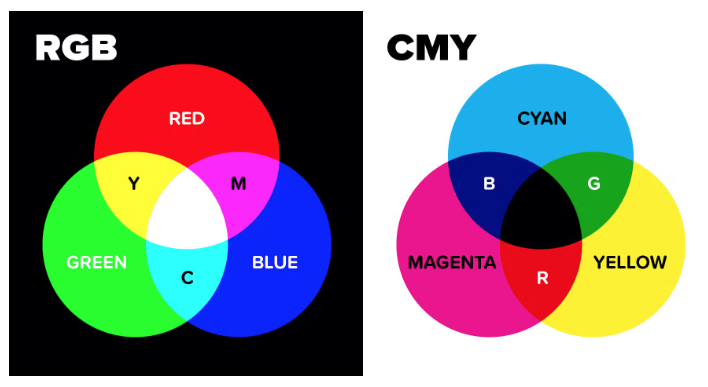
They both start with three primary colors, which combine to form all other colors. For RGB, these are red, green, and blue. For CMYK, they are cyan, magenta, and yellow.
RGB is an additive process that uses colored light, while CMYK is a subtractive process that uses pigments such as ink, dyes, or paint.
These two systems are fundamentally different—you could even call them opposites—so it’s important to understand the differences between them.
Since most printers and commercial printing companies will convert files, the only thing you need to worry about is whether you’re using CMYK mode when it isn’t necessary (as the colors you can use will be somewhat limited).
RGB
- What is RGB?
RGB stands for Red, Green, and Blue, and is the color model used by computer monitors, televisions, smartphones, and other devices.
The RGB color gamut (range of colors) is wider than that of CMYK, including bright, saturated, and fluorescent colors. All RGB images must ultimately be converted to CMYK for printing.
RGB is an additive color system that uses light emitted by a screen or projector. When the light is turned off, it appears as pure black; when all colors are combined at full intensity, pure white is produced.
Just like theater lighting, if you shine red, green, and blue lights on the same spot, you’ll get something close to white. If the color wheel spins very fast, you’ll also see white.
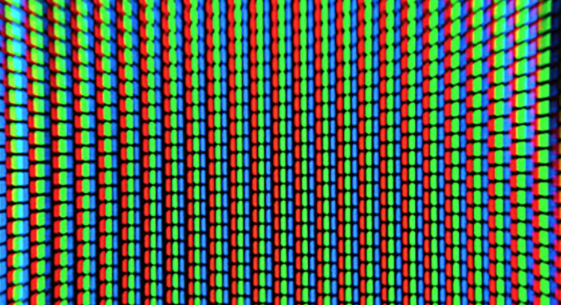
On a computer screen, each of the millions of pixels has three sub-pixels that light up with varying intensities of red, green, and blue. When these colors combine, they form the wide range of colors that our eyes can distinguish at a normal viewing distance.
2. When Should You Use RGB?
When creating designs for print, it is common practice to work in CMYK to avoid color discrepancies during printing or the need for conversion before sending the file.
If you are creating designs intended solely for viewing on a screen, you should use RGB, as colors in RGB mode are brighter and more vibrant.
3. How to Use RGB?
Each color value in RGB ranges from 0 (lowest saturation) to 255 (highest saturation), allowing for a total of over 16 million colors to be represented in the color space.
In Photoshop and other image editing software, you can set these values or select a color first and note down the numbers. Better yet, save it as a swatch.
CMYK
- What is CMYK?
CMYK is a color model used in printing, particularly for photorealistic images and images with a wide range of colors. These inks are semi-transparent, and when mixed together, they produce a wide range of colors. It is based on the CMY model, in which cyan, magenta, and yellow are the primary colors.
In printing, CMYK is also known as the “four-color process.” Due to the translucency of the inks, the full combination of C+M+Y is not dark enough, so a fourth color—black ink, represented by K—is used. - How do you use CMYK?
If you’re using Adobe Illustrator, new files are set to CMYK by default, so you’re already working in that color space. Adobe Photoshop uses RGB by default, so before creating a design, first switch to CMYK under “Image” > “Mode.” This ensures that any colors you select will not change when printed.
- How does CMYK work?
CMYK is known for reproducing photorealistic images—a process also known as color reproduction. These types of images feature subtle blends, gradients, and details, so how does CMYK achieve this with just four colors? This is where halftones come into play.
Halftones are essentially tiny dots that create a visual illusion. If you look closely at any magazine or printed material (for example, through a magnifying glass), you’ll see halftone patterns.
Set the Correct Colors Before Printing
Before creating a print file, you must set the correct color format—CMYK for print colors. Submitting a print file with an RGB color profile is perhaps the most common mistake, and it’s one that people rarely pay attention to.
We cannot stress this enough: you cannot rely on a screen to define colors. If you want to check how colors will appear in print, the only way is to use a digital proof as an accurate reference.
If you haven’t used a CMYK color profile from the start, don’t worry—you can convert to the correct color profile at any time. It’s important to have someone verify that all colors match the ones selected in the artwork.
If we receive an RGB file, we can help you convert it; we’ll automatically correct it for printing. However, switching from one color model to another can result in significant color differences, so it’s best to take this step to avoid surprises.
Issues Related to Documents
1. Can RGB images be printed?
With current technology, no—RGB must first be converted to CMYK mode. Of course, a new technology is being developed that allows printing using the RGB process, but it is not yet widely used (and is likely to be expensive).
2. Which file formats are best suited for RGB?
PNG is the best format for RGB images because it supports millions of colors, allows for transparent backgrounds, is compatible with most digital display systems, and results in smaller file sizes.
JPG or JPEG is also an excellent format for RGB images. It is widely compatible and the most popular image format. It allows for various compression settings to achieve smaller file sizes.
If the image is animated, or if you’re looking for the smallest possible file size, you should use GIF. Compression can alter the appearance, as it significantly reduces the number of colors, depending on the settings.
PSD (Adobe Photoshop) is the standard file format for RGB graphics. It can be converted to virtually any color space and format suitable for any platform or medium.
- Which file formats are best suited for CMYK?
AI (Adobe Illustrator) is the standard file format for CMYK images. Since it is a vector program, there are no issues with resolution or resizing graphics. New files open in CMYK by default.
EPS is an excellent format for CMYK because it offers all the advantages of a vector file type while remaining compatible with other vector programs. It also provides excellent compression capabilities for smaller file sizes.
PDF is another standard format that is well-suited for CMYK files. It offers numerous saving options, file types, and compression settings. It supports bitmap, vector, and composite files and features a powerful compression engine.